Convertir du manuscrit en PDF avec GPT-4o Vision et Laravel
Découvrez comment transformer vos notes manuscrites en PDF propres grâce à GPT-4o Vision, Laravel et Filament !
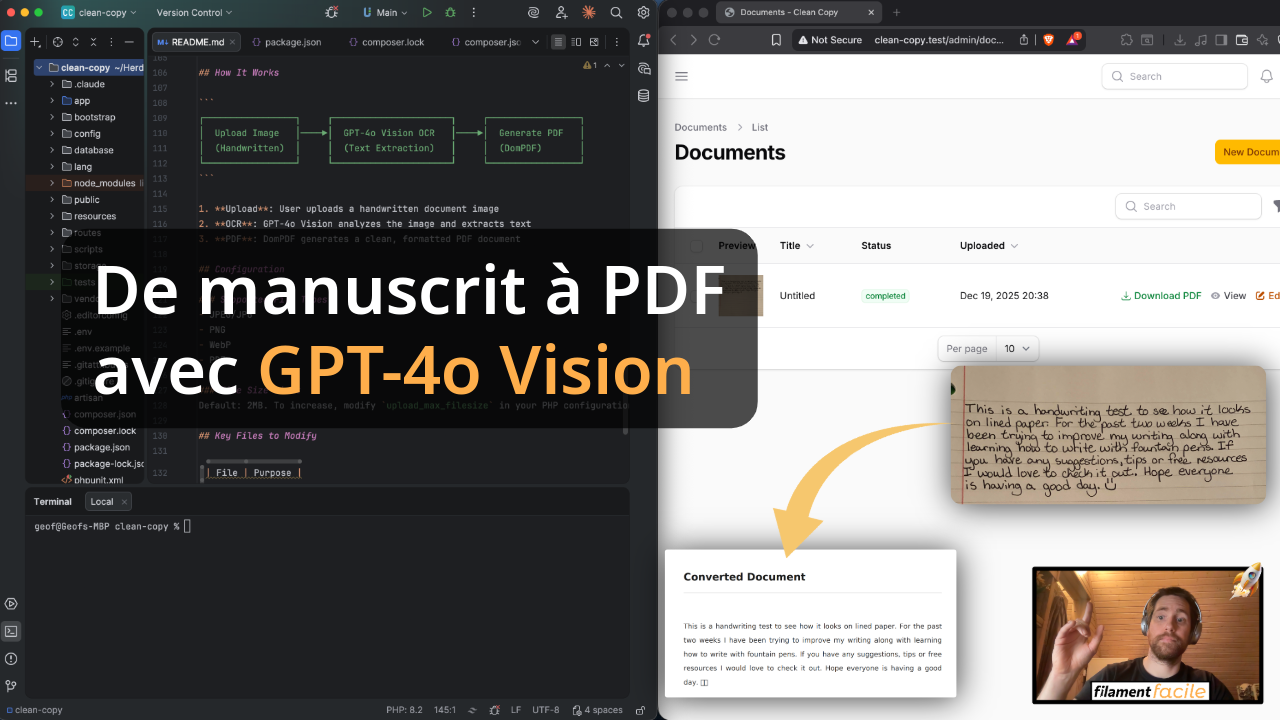
Apprenez à créer une application de conversion de documents manuscrits en PDF propres en utilisant Laravel, FilamentPHP et l'API GPT-4o Vision d'OpenAI. Ce guide vous accompagne pour mettre en place un système OCR intelligent avec génération automatique de PDF.
Prérequis
Avant de commencer, assurez-vous d'avoir :
- Une application Laravel installée
- FilamentPHP v4 configuré
- Une clé API OpenAI avec accès à GPT-4o
- Le package DomPDF installé
Installation des dépendances
composer require openai-php/laravel barryvdh/laravel-dompdf
Ajoutez votre clé API dans .env :
OPENAI_API_KEY=sk-your-api-key-here
Création du Modèle et Migration
php artisan make:model Document -m
Dans la migration :
$table->foreignId('user_id')->constrained()->cascadeOnDelete();
$table->string('title')->nullable();
$table->string('original_file'); // fichier manuscrit uploadé
$table->text('extracted_text')->nullable(); // résultat OCR
$table->string('output_pdf')->nullable(); // PDF généré
$table->enum('status', ['pending', 'processing', 'completed', 'failed'])->default('pending');
$table->text('error_message')->nullable();
Service de Reconnaissance d'Écriture
Créez app/Services/HandwritingRecognitionService.php :
class HandwritingRecognitionService
{
    public function extractText(string $filePath): string
    {
        $fullPath = Storage::disk('public')->path($filePath);
        $mimeType = mime_content_type($fullPath);
        $base64Image = base64_encode(file_get_contents($fullPath));

        $response = OpenAI::chat()->create([
            'model' => 'gpt-4o',
            'messages' => [
                [
                    'role' => 'user',
                    'content' => [
                        [
                            'type' => 'text',
                            'text' => 'Please extract and transcribe all the handwritten text from this image...',
                        ],
                        [
                            'type' => 'image_url',
                            'image_url' => [
                                'url' => "data:{$mimeType};base64,{$base64Image}",
                            ],
                        ],
                    ],
                ],
            ],
        ]);

        return $response->choices[0]->message->content ?? '';
    }
}
Service de Génération PDF
Créez app/Services/PdfGeneratorService.php :
class PdfGeneratorService
{
    public function generateCleanPdf(string $text, string $title = 'Document'): string
    {
        $html = $this->buildHtml($text, $title);

        $pdf = Pdf::loadHTML($html)
            ->setPaper('a4', 'portrait');

        $filename = 'documents/' . uniqid('clean_') . '.pdf';
        Storage::disk('public')->put($filename, $pdf->output());

        return $filename;
    }
}
Service d'Orchestration
Créez app/Services/DocumentConversionService.php pour coordonner le tout :
class DocumentConversionService
{
    public function __construct(
        private HandwritingRecognitionService $recognitionService,
        private PdfGeneratorService $pdfGeneratorService
    ) {}

    public function convert(Document $document): Document
    {
        $document->update(['status' => 'processing']);

        $extractedText = $this->recognitionService->extractText($document->original_file);
        $document->update(['extracted_text' => $extractedText]);

        $outputPdf = $this->pdfGeneratorService->generateCleanPdf($extractedText, $document->title);
        $document->update(['output_pdf' => $outputPdf, 'status' => 'completed']);

        return $document->fresh();
    }
}
Resource Filament
Générez la Resource :
php artisan make:filament-resource Document
Ajoutez un bouton de conversion dans la table et une action pour télécharger le PDF généré.
Conclusion
En quelques étapes, vous avez une application complète qui :
- Upload des documents manuscrits (images)
- Extrait le texte via GPT-4o Vision
- Génère un PDF propre et formaté
- Gère les statuts de conversion en temps réel
L'API Vision de GPT-4o est impressionnante pour la reconnaissance d'écriture manuscrite, même avec des écritures difficiles à lire.
Obtenez le Code Source Complet
Gagnez du temps et accédez à l'intégralité du projet.
Je veux le code source